Capability
Salesforce POS for assisted transactions, executed natively
Eposly is the Salesforce POS and point-of-sale platform built natively on Salesforce. Pricing, payment, and order completion happen inside Salesforce, on the customer record, in real time. No external POS systems, no middleware.
The challenge
The cost of executing transactions outside Salesforce
Most Salesforce orgs run their POS outside Salesforce. Traditional architectures push transactions through middleware into external POS systems, then attempt to sync data back into Salesforce. The result is fragmented data, delayed synchronization, complex integrations, and limited operational visibility. That gap also extends to the payments hardware itself: terminals and related transaction systems sit outside Salesforce, adding another layer of operational complexity.
-
01
Fragmented data
Transaction data lives in a separate system. Customer records in Salesforce are incomplete.
01
Fragmented data
Transaction data lives in a separate system. Customer records in Salesforce are incomplete.
-
02
Complex integrations
Middleware, APIs, and sync jobs create maintenance overhead and failure points.
02
Complex integrations
Middleware, APIs, and sync jobs create maintenance overhead and failure points.
-
03
Delayed visibility
Teams can't see transaction outcomes in real time. Reporting depends on batch syncs.
03
Delayed visibility
Teams can't see transaction outcomes in real time. Reporting depends on batch syncs.
See a transaction in action
How orders and payments are completed in a single Salesforce flow.
The Eposly approach
A Salesforce POS that runs where the data lives
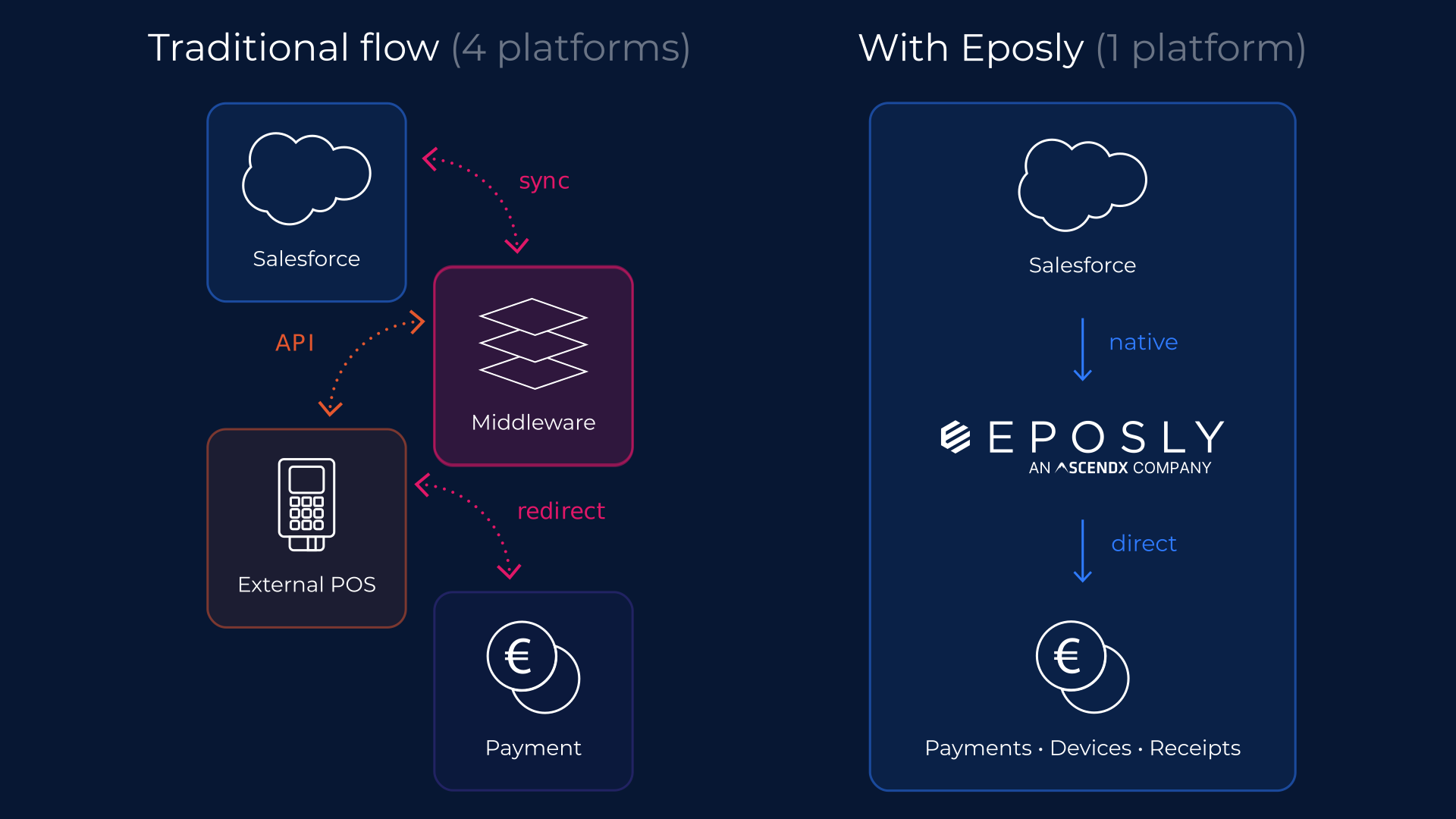
Eposly is a Salesforce POS that runs directly on Salesforce objects, automation, and the same data model. No middleware. No sync. No reconciliation.
Data architecture
Native Salesforce objects, native integrations
Eposly uses standard and custom Salesforce objects for all transaction data. This means native reporting, automation, and integration — with no middleware layer.
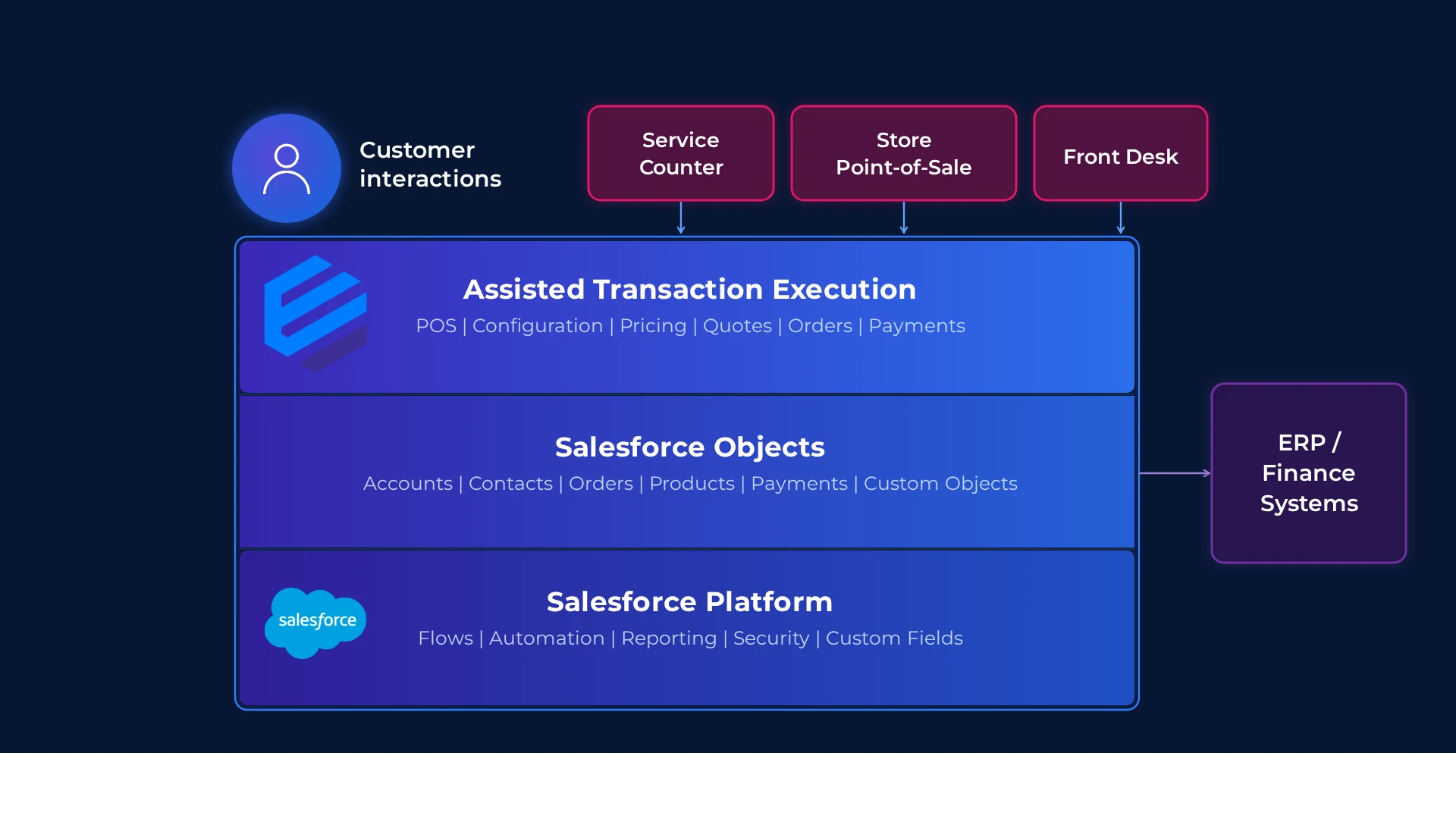
Salesforce native architecture: same data model, objects, and automation. Integrates where needed without breaking Salesforce as the system of record.
Features
Core transaction execution features

Salesforce-native transaction execution
Complete configuration, pricing, payment, and order creation in one Salesforce flow.
Unified customer and transaction records
Capture every transaction directly on the Salesforce customer record.
Real-time order creation
Create orders instantly during the customer interaction without external checkout systems.

Transaction-driven customer intelligence
Each transaction enriches Salesforce with pricing, configuration, and purchase data.
Salesforce-native data model
Leverage Salesforce objects for reporting, automation, and customization.
Salesforce automation compatibility
Trigger flows, automations, and integrations directly from transaction data.
“The system is well-architected to serve a variety of customer use cases, from out-of-the-box point of sale to custom implementations with different integration points. Highly recommended.”
— Will Nourse
In practice
See it in action

How a retail jeweller executes configured transactions
A sales associate at a luxury jewellery retailer helps a customer configure a custom ring — selecting stone type, setting, and engraving. Pricing updates in real time as options are chosen. The associate applies a returning-customer discount, processes payment via card terminal, and the complete order, configuration details, and payment confirmation are recorded on the customer's Salesforce record. When the customer returns months later, the next associate has full visibility into what was purchased, how it was configured, and what pricing applied.
Why Salesforce-native
Why a Salesforce-native POS wins
Eposly is the only POS that runs 100% inside Salesforce — not connected to it via API or middleware. When a transaction executes natively, every Salesforce Flow fires immediately, every customer record updates in real time, and every automation runs without a webhook delay or sync job. No middleware. No reconciliation. No second system of record. The result is a Salesforce environment where the transaction itself happens inside the platform, not outside it.
01
Unified data model
Transaction, order, and customer data share the same Salesforce schema.
02
No integration layer
No middleware, APIs, or sync jobs to build or maintain.
03
No reconciliation required
Transactions are created inside Salesforce, not synced to it. There is no external ledger to reconcile — orders and payments are linked at the moment of execution.
04
Native automation
Transactions trigger Salesforce Flows, Process Builder, and approval workflows.
05
Real-time visibility
All transaction data immediately available in Salesforce reports and dashboards.
06
Built to adapt
Runs natively on Salesforce objects, fields, and flows. Teams extend transactions using standard Salesforce configuration, not custom development.
07
Faster operational changes
No rigid external POS logic to work around. Add a field, adjust a flow, change a process — with familiar Salesforce tools.
Related capabilities
Explore other capabilities
FAQ
Frequently asked questions
Ready to run the whole sales process inside Salesforce?
See how this would work in your Salesforce setup.