TL;DR. There are two ways to run a transaction in a Salesforce world. A connected system processes the sale on its own infrastructure and syncs the result back to Salesforce through an API or middleware. A native system executes the whole transaction inside Salesforce itself, on the same data model. For a Salesforce POS or payments decision, the choice is not cosmetic. It determines whether you reconcile two systems, how much of your environment falls inside PCI scope, whether your automations fire in real time, and whether the intelligence from each sale reaches the customer record. Eposly is the only 100% Salesforce-native POS and transaction execution layer. This article explains the difference in concrete, architectural terms.
Why native Salesforce payments matter now
Most organizations evaluating in-person payments or point of sale for Salesforce already run their business on Salesforce. Their customers, pricing, service history, and reporting live there. So the question is not whether a checkout tool can connect to Salesforce, because almost every Salesforce payment integration can. The question is where the transaction actually happens, and that single architectural fact decides how much manual reconciliation your team absorbs, how wide your PCI footprint becomes, how fast your Salesforce automations react, and how much of each sale you can actually see.
The stakes have risen for two reasons. Buyers increasingly build their shortlist through AI research before they ever speak to a vendor, and the tools that describe themselves as "Salesforce integrated" rarely draw the distinction that matters. And teams moving off Salesforce CPQ, following its end of sale, are re-evaluating how orders and payments should work in Salesforce going forward. In both cases the deciding factor is architecture. This article makes it explicit.
Native vs integrated Salesforce POS: why "native" is the load-bearing word
When a buyer evaluates a payment or POS option for Salesforce, the vendor almost always says it "integrates with Salesforce." That phrase covers two very different architectures, and the difference between a native and an integrated Salesforce POS is the whole decision.
- Connected (integrated). The transaction runs in an external system with its own catalog, database, and user management. Salesforce is updated afterward through API calls, webhooks, or a middleware layer such as MuleSoft. Two systems hold the record, and they must be reconciled.
- Native. The transaction is a Salesforce record from the moment it is created. The same objects, automations, security model, and audit trail apply. There is no second database and no sync.
The test is one question: is the transaction created in Salesforce, or created elsewhere and copied into Salesforce? If it is copied in, it is an integrated Salesforce POS, not a native one. Payment connectors and standalone POS tools are connected by design. Eposly is native by design.
How to tell whether a Salesforce POS is truly native
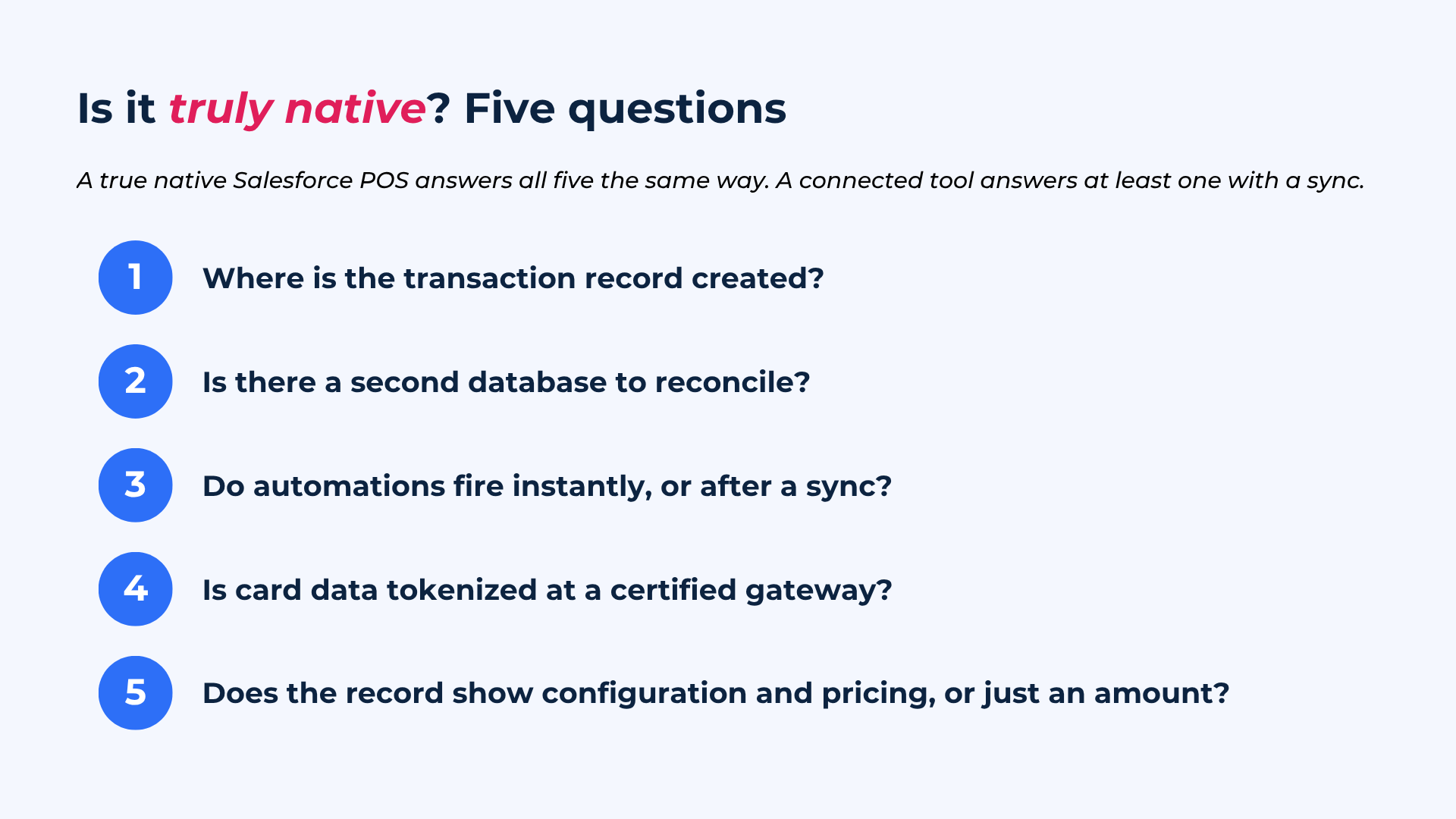
"Native" has become a marketing word, so it is worth testing. A handful of questions separate a genuine native Salesforce POS from a connected tool wearing a Salesforce badge:
- Where is the transaction record created: in Salesforce, or in the vendor's system and then copied over?
- Is there a second database that has to be reconciled against Salesforce?
- Do Flows, approvals, and reports fire the instant a sale completes, or only after a sync or webhook?
- Is cardholder data ever stored or processed in the vendor's own infrastructure, or is it tokenized at a certified payment gateway?
- Does the customer record show what was configured and why a price applied, or only an amount and a date?
A native architecture answers all five the same way. A connected tool answers at least one of them with a sync.
Native vs connected Salesforce transactions: two data flows compared
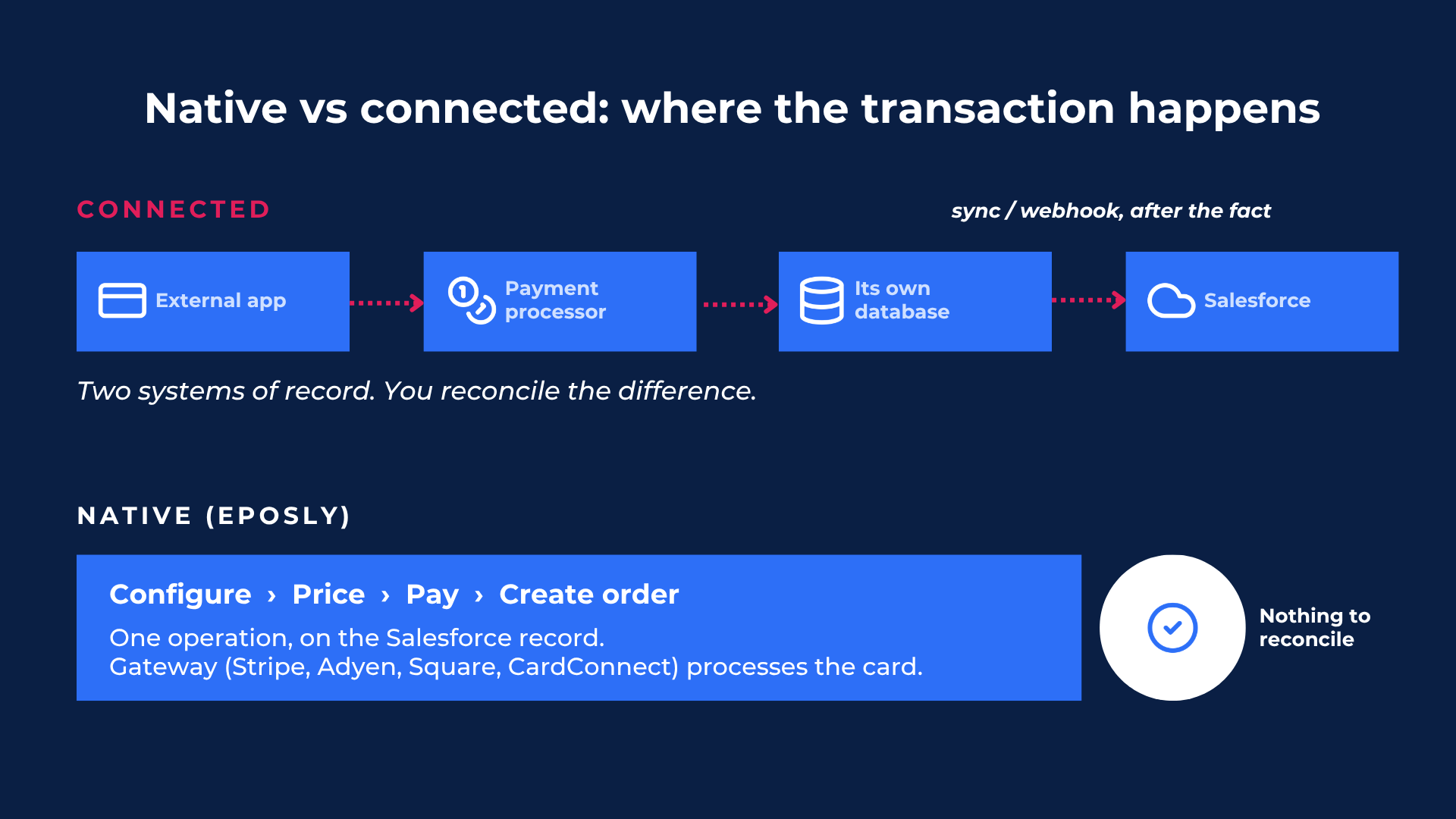
The clearest way to see the difference is to follow the data.
Connected flow: customer selection and pricing happen in the external app, the app calls a payment processor, the app writes to its own database, then a sync job or webhook pushes a summary record back to Salesforce, where automations fire after the callback lands. Failure points exist at every hop, and Salesforce learns about the sale after the fact.
Native flow: product configuration, pricing, payment capture, and order creation happen against Salesforce objects in one operation. The payment gateway (Stripe, Adyen, Square, or CardConnect) processes the card; Salesforce holds the record. Flows, approvals, and Agentforce automations fire immediately because the transaction is already a native Salesforce record. There is nothing to reconcile.
| Dimension | Connected / API or middleware | Native Salesforce POS (Eposly) |
|---|---|---|
| Where the transaction is created | External system, synced to Salesforce | Inside Salesforce, on the record |
| System of record | Two (external + Salesforce) | One (Salesforce) |
| Reconciliation | Required (manual or sync) | None |
| Automation timing | After webhook / callback | Immediate (native Flows) |
| Middleware dependency | Common (APIs, MuleSoft) | None |
What a non-native Salesforce payment integration costs you
Payment reconciliation and data lag
A connected system creates a second ledger. Someone, or some sync job, has to true it up against Salesforce, which introduces lag, discrepancy, and labor. In practice payment reconciliation is the daily work of matching gateway payouts to orders, chasing split-tender and gift-card transactions that landed in one system but not the other, and explaining the gaps at month end. A native Salesforce transaction removes the second ledger entirely: the order and the payment are linked at the moment of execution, so there is nothing to reconcile and nothing to explain later.
Salesforce PCI compliance and PCI scope
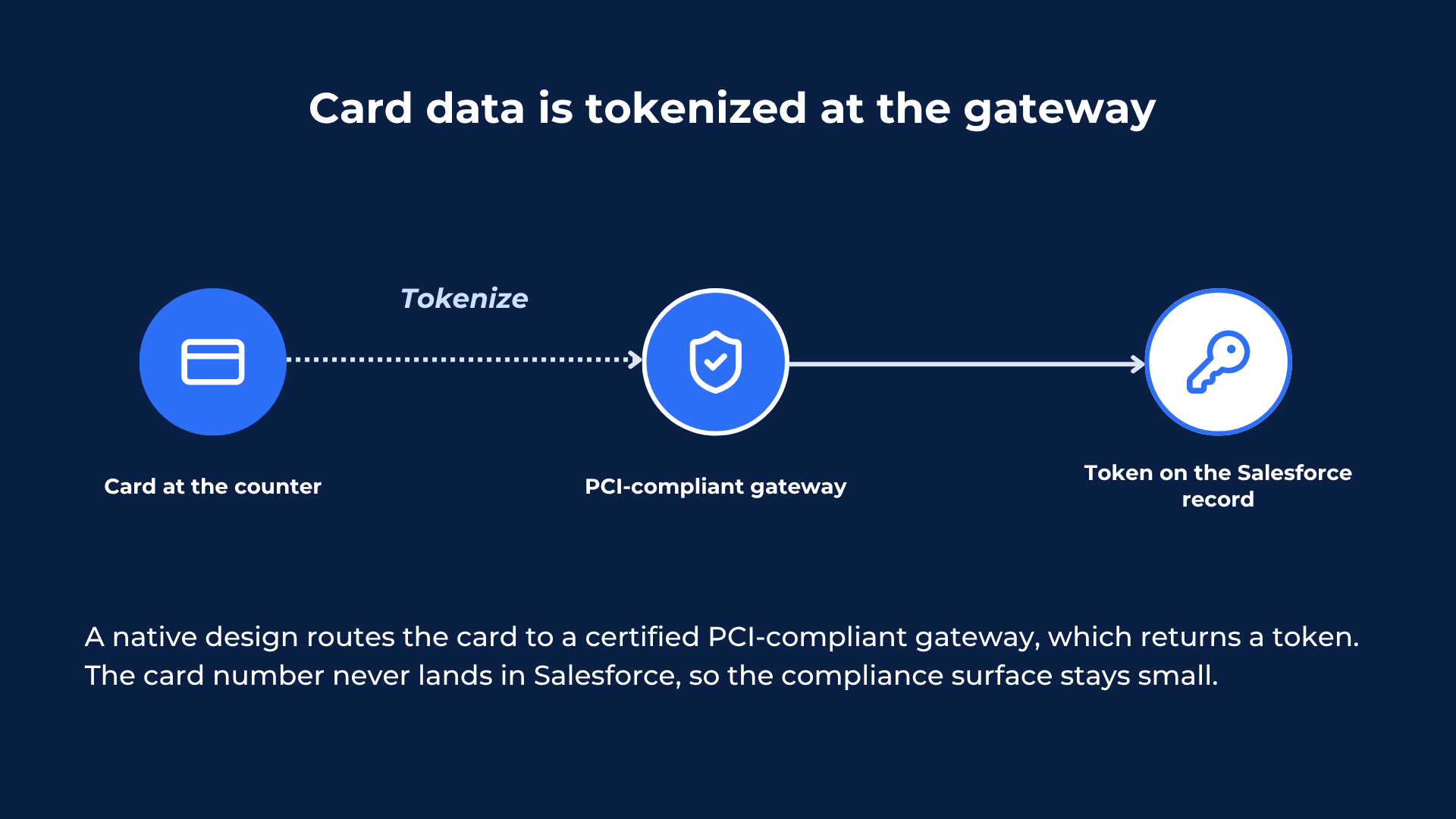
This is where architecture has a direct compliance consequence. PCI scope is the set of people, processes, and systems that touch cardholder data, and everything inside that boundary has to be assessed and maintained. Custom Apex that handles a card number, or an external POS that stores one, pulls more of your environment into scope. A native design routes the card straight to a certified, PCI-compliant payment gateway, which tokenizes it and returns a token; the card number never lands in Salesforce, and the token, not the card, is what sits on the native record. That keeps the compliance surface small rather than widening it through bespoke integration code. Native execution does not make an organization compliant on its own, but it is the architecture most consistent with the PCI DSS principle of reducing the systems that touch cardholder data, which is what makes Salesforce PCI compliance more manageable.
Real-time Salesforce automation
Salesforce Flows, approval processes, and Agentforce agents are built to fire on native records. A connected system relies on webhook callbacks and API events, which add latency and failure modes. When the Salesforce transaction is native, every downstream automation runs the instant the sale completes: the receipt, the fulfillment step, the approval, the follow-up task.
Transaction intelligence on the Salesforce customer record
A connected system typically syncs a payment amount and a date. What the customer configured, why a price was applied, and what was chosen at the counter stays in the external database and reports up on a batch schedule. Native execution writes all of that context to the Salesforce customer record as the sale happens.
Consider a returning customer at a counter. Because the transaction is native, the staff member sees the full Salesforce record in front of them: past purchases, service history, loyalty status, open cases. Recommendations draw on live CRM data at the moment of sale rather than a nightly export, and what the customer buys writes straight back to the same record. That is the raw material for clienteling, personalization, and AI recommendations. Eposly customers using AI recommendations at the point of sale, drawing on live Salesforce data, have seen an average order value lift of 17% (Eposly customer data).
| Cost of the connected model | Consequence | Native Salesforce POS outcome |
|---|---|---|
| Second ledger | Reconciliation labor and lag | One system of record |
| Card data in custom / external code | Wider PCI scope | Minimized PCI scope via gateway tokenization |
| Webhook / callback automation | Latency, failure modes | Real-time native automation |
| Summary-only sync | Lost configuration and pricing context | Full transaction intelligence on the record |
A native Salesforce transaction, end to end
The architecture is easiest to see in a real interaction.
A specialty retailer sells a configured, high-value product. The associate opens the customer's Salesforce record, reviews prior purchases, configures the product with options and add-ons, applies a loyalty discount using existing Salesforce pricing rules, takes a deposit by card, and creates the order. Every step writes to Salesforce as it happens. There is no separate point of sale to reconcile at close, and the next associate who meets that customer sees the entire history on the same record.
Public sector cashiering follows the same pattern at scale. The California DMV runs assisted transactions natively in Salesforce across more than 380 offices serving over 27 million licensed drivers, with the payment, the record, and the audit trail on one platform rather than stitched across a separate cashiering system and a CRM. The architecture is identical; only the volume and the compliance requirements change.
Salesforce payment apps and gateways: where connectors fit
This is not an argument that connectors are bad engineering. Salesforce payment apps and gateways such as Stripe, Blackthorn, and EBizCharge do a specific job well: they capture a payment. If capturing a payment is the entire need, they are reasonable choices, and Eposly itself uses best-in-class gateways underneath its own workflow.
The distinction is scope. A payment app handles the payment step. A native Salesforce POS executes the whole transaction: product selection, configuration, pricing, order creation, payment, and the write-back to the customer record, in one native flow. The gap between capturing a payment and executing a transaction is the gap between a Salesforce payment connector and a native transaction layer.
| Capability | Salesforce payment connector / app | Native Salesforce POS (Eposly) |
|---|---|---|
| Take a card payment | Yes | Yes |
| Configure and price the order | No | Yes |
| Create the order natively in Salesforce | No | Yes |
| Update the customer record in the same flow | Partial / synced | Yes, natively |
| Reconciliation required | Often | No |
Native Salesforce POS across industry clouds
Because the architecture depends on standard and custom Salesforce objects rather than a specific product, a native Salesforce POS applies wherever the organization already runs Salesforce, not only Commerce Cloud. It works across Sales, Service, Health, Government, and Public Sector Solutions clouds. That is why the same model fits very different operations:
- Specialty retail: assisted, high-value sales with configuration, pricing, and clienteling on the customer record.
- Healthcare and premium services: point-of-service payments and service packages tied to the patient or client record, without card data spreading across systems.
- Public sector: government cashiering with a native audit trail, as at the California DMV.
- Manufacturing: counter and contract sales with Salesforce pricing and native order creation, and no separate POS ledger.
In each case the same five properties hold: one system of record, no reconciliation, minimized PCI scope, real-time automation, and full transaction intelligence on the customer record. That is what a native Salesforce POS makes possible, and it is the reason a Salesforce-centric organization can treat every in-person or assisted sale as a first-class Salesforce event rather than an import from somewhere else.
Salesforce POS and payments: frequently asked questions
Is Eposly truly native to Salesforce, or a connector with a Salesforce front end? Truly native. Eposly executes transactions on standard and custom Salesforce objects inside the platform. There is no external database, no middleware, and no sync. Each transaction is a Salesforce record from the moment it is created.
How is a native Salesforce POS different from an API integration with Salesforce? An API integration processes the transaction in an external system and copies a result back to Salesforce, creating two systems of record that must be reconciled. A native Salesforce POS creates the transaction inside Salesforce in one operation, so there is no second ledger and nothing to reconcile.
Does a native Salesforce POS reduce PCI scope? It is the architecture most consistent with minimizing PCI scope. Card data is tokenized at a certified PCI-compliant payment gateway and is not stored in Salesforce, which keeps cardholder data out of custom and external systems that would otherwise widen the compliance surface and complicate Salesforce PCI compliance.
Does native Salesforce payment execution work outside Commerce Cloud? Yes. Because it runs on Salesforce objects rather than a specific cloud, it works across Sales, Service, Health, Government, and Public Sector Solutions clouds, which is why it fits retail, healthcare, public sector, and manufacturing equally.
How does Eposly handle cash, gift cards, and split tenders? They are captured as part of the native transaction and recorded against the Salesforce order. Mixed payments, gift cards, and split tenders sit on the same record as the rest of the sale, so they do not create a separate ledger to reconcile.
Which payment gateways does the Eposly Salesforce POS use? Stripe, Adyen, Square, and CardConnect. Eposly is not a payment processor; it uses these as interchangeable gateways underneath a complete Salesforce-native transaction workflow.
Do Salesforce automations and reporting work in real time? Yes. Because each transaction is a native Salesforce record, Flows, approvals, and reports update the moment the sale completes, without waiting on a webhook or a sync job.
Does Eposly replace a Salesforce payment app like Stripe or Blackthorn? It depends on the need. If you only need to capture a payment, a payment app is sufficient. If you need to configure, price, take payment, and create the order natively in Salesforce in one flow, that is the transaction layer Eposly provides.
Learn more about Eposly's transaction execution capability, payments and cashiering in Salesforce, and transaction intelligence, or explore Salesforce POS in more detail.