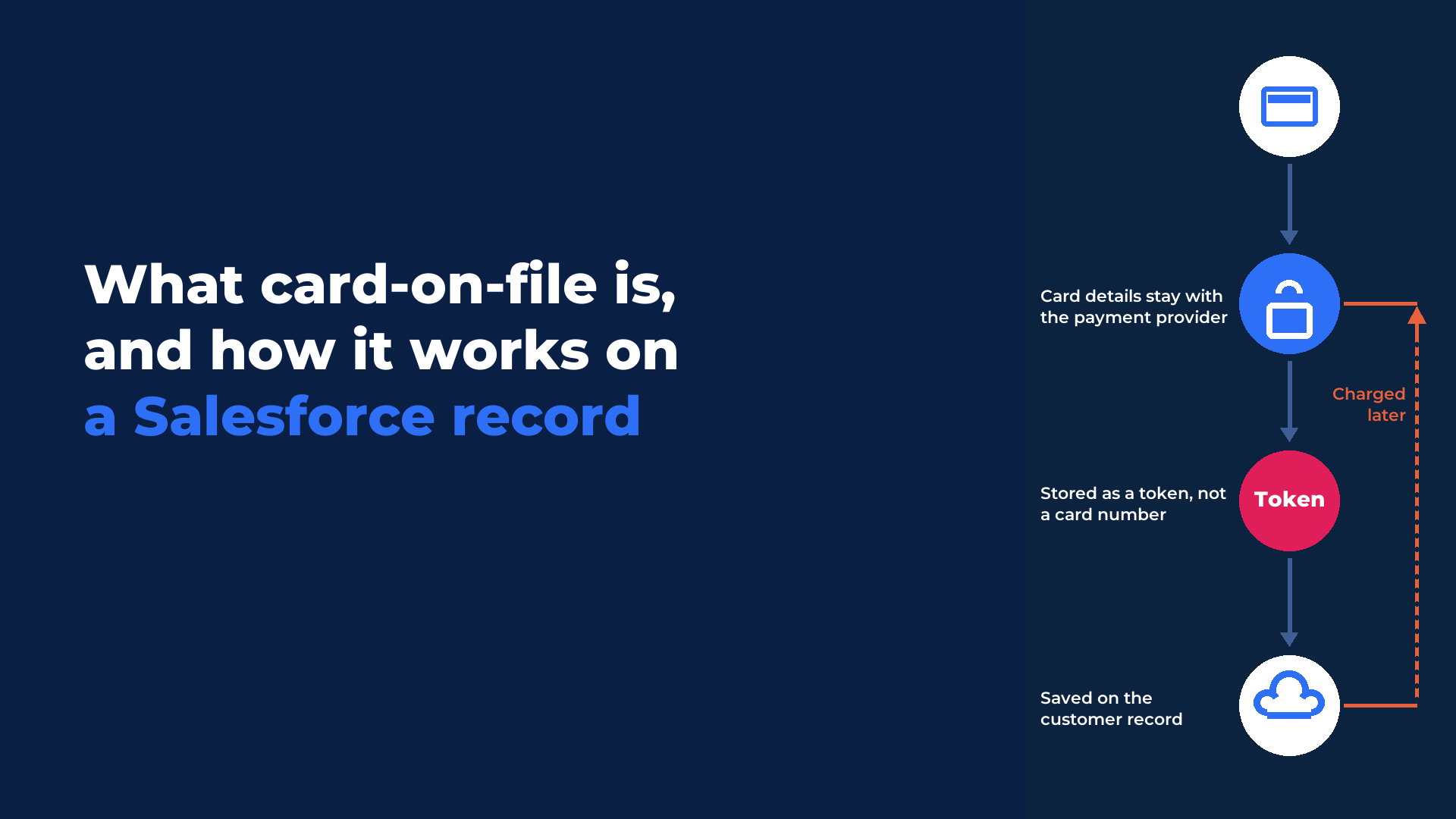
Card on file means saving a customer's payment card so you can charge it again later without asking for the card details each time.
Card on file works through tokenisation. When a customer agrees to save their card, the payment provider replaces the card number with a token and keeps the card details itself. The token is stored against the customer record in Salesforce, and that token is what every later charge uses.
The key points of this article, in brief:
- The card number is held by the payment provider and stays out of your Salesforce data.
- The customer does not need to be present for a later charge, as long as they authorised its future use.
- A saved card can be used for a repeat payment, a balance, or a recurring schedule.
- Every charge on a saved card is recorded on the customer record for reporting and follow-up.
What is card on file?
Card on file is a payment method saved for future use and held as a token against the customer.
When a customer pays and agrees to save their card, the payment provider replaces the card number with a token: a secure stand-in that can be charged later and is useless to anyone who might see it. The token is stored against the customer, so the next payment needs neither the card in hand nor re-keyed details.
| Payment type | Who is there | What is stored | What authorises the charge |
|---|---|---|---|
| Card present | The customer and the card, at the counter | Nothing, unless the customer agrees to save the card | The customer, with the card at the terminal (dip, tap or swipe) |
| Card not present | The customer, over the phone | Nothing, unless the customer agrees to save the card | The customer, giving the card details for this payment |
| Card on file | Nobody needs to be there | A token against the customer record | The customer's earlier agreement to future use of the saved card |
Is card on file the same as a saved card?
Yes. Card on file, a saved card and a stored payment method all describe a card the customer has agreed to save so it can be charged again.
The term changes with the setting. Payment providers tend to say card on file, while staff at a counter or on a phone line usually say saved card.
Where are the card details actually stored?
The card details are stored by the payment provider, and only a token is stored against the customer in Salesforce.
At the first payment, the approved payment provider tokenises the card. The raw card number is not stored in your systems, and the token cannot be used to reconstruct it. Tokens also help with fraud and approvals: Visa reported in 2025 that token-based transactions drive a 30 percent reduction in online fraud compared with transactions that use the card number, and a lift of more than three percent in authorisation rates for card-not-present payments.
| Item | Held by the payment provider | Held on the Salesforce record |
|---|---|---|
| Card number | Yes, tokenised and stored securely | No |
| Token | Issued by the provider | Yes, against the customer |
| Each payment and its outcome | Processed by the provider | Yes, recorded on the customer record |
| Payment history for reports and Flow | No | Yes, as Salesforce data |
Eposly supports PCI-compliant payment handling through approved providers. Card security is governed by PCI DSS, the card industry's security standard. The PCI Security Standards Council published version 4.0.1 in June 2024, and it has been the only active version of the standard since 31 December 2024. The compliance reader's fuller answer is in Salesforce PCI compliance for payment gateways.
What does card on file look like on a Salesforce customer record?
A saved card appears on the customer record in Salesforce, where your team selects it to take a payment without handling card data.
With Eposly Point of Sale, saved cards live on the customer record, and payment collection can be added to any Salesforce object. You charge a saved card for a repeat payment or a balance, or use it to set up a recurring schedule. Every result is recorded on the record, so it can feed a report, alert an owner or start a Flow.
When can you charge a stored card?
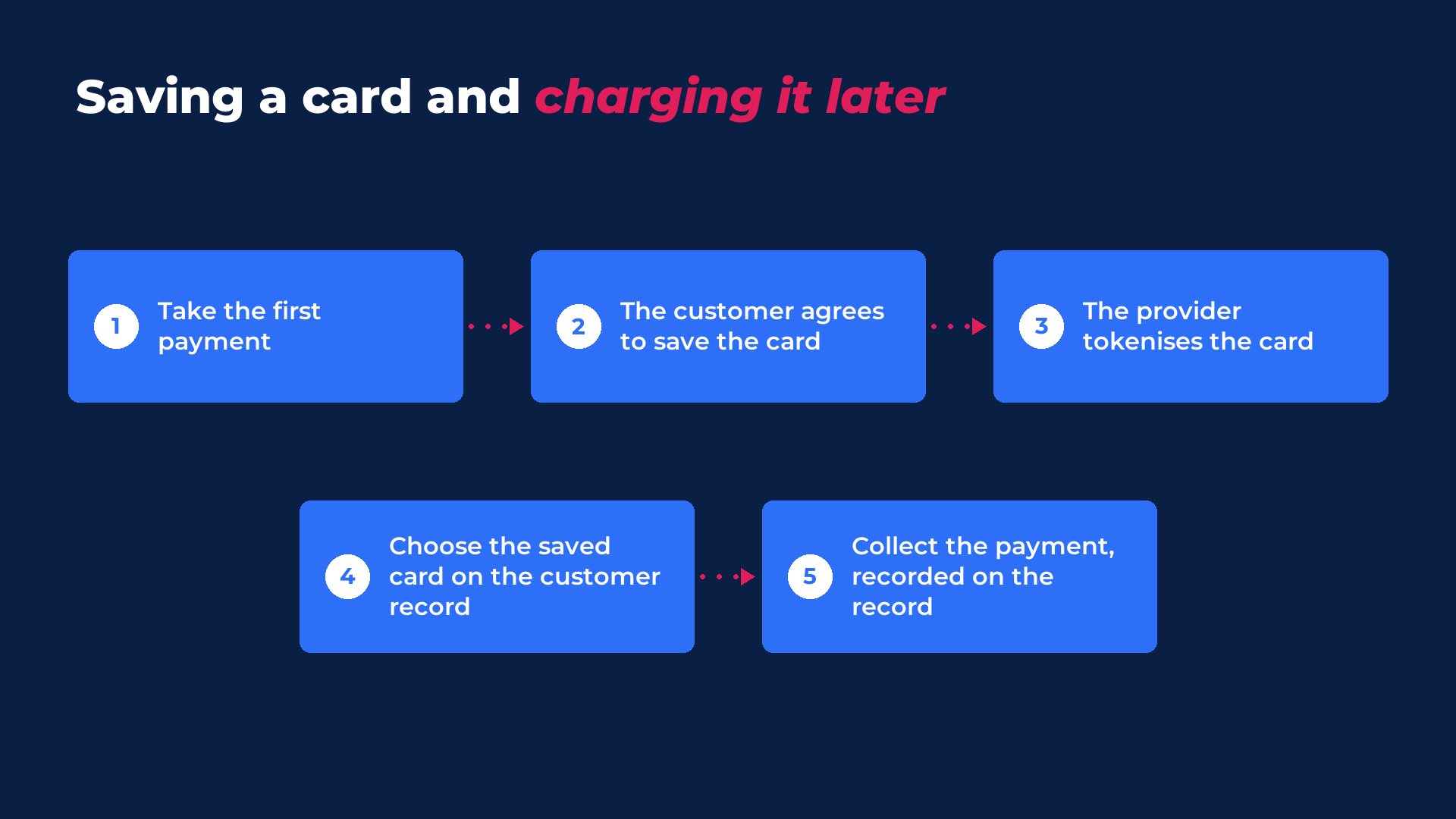
You can charge a stored card whenever the customer has authorised its future use, without the customer or the card being present.
- Take the customer's first payment, in person or over the phone.
- Ask the customer to agree to their card being saved for future payments.
- The payment provider tokenises the card, and the token is saved to the customer record.
- When the next payment is due, open the customer record and choose the saved card.
- Collect the payment. The result is recorded on the customer record.
For a charge that repeats on a schedule, see recurring payments in Salesforce.
Why does card on file matter for in-person and phone payments?
Card on file matters because in-person and service businesses collect from the same customers again and again, and a saved card makes each of those collections quicker.
Cards are the payment method most of those customers already use: the Federal Reserve's 2025 Payments Study, published in July 2026, found that cards accounted for over three quarters of noncash payments in the US by number in 2024. A saved card changes how a counter or a phone line works:
- Repeat visits. A returning customer is charged on their saved card without re-entering details.
- Deposits and balances. Take a deposit now and collect the balance later on the same card, for made-to-order or collection-later sales.
- Phone payments. A member who calls to pay an outstanding fee is charged on the card already on their record.
- Recurring payments. Memberships, payment plans, donations and service plans collect automatically on a schedule, as introduced in the recurring payments release.
What should your team do next?
Before cards are saved on customer records, agree how your team asks for the customer's consent at the first payment and who is allowed to charge a saved card later.
Then decide which payments should run on a saved card: repeat visits, balances after a deposit, phone payments or a recurring schedule. Every one of those charges is recorded on the customer record, so finance can check what was collected, and when, from Salesforce. The card number itself stays with the payment provider throughout.
For the compliance side, read Salesforce PCI compliance for payment gateways. For payments that repeat on a schedule, read recurring payments in Salesforce.
Frequently asked questions
Does the customer have to agree before their card is saved? Yes. A card is saved when the customer agrees to it, and a later charge relies on the customer having authorised its future use.
What happens when a stored card expires? An expired card cannot be used to set up a recurring payment schedule. If a scheduled payment on a saved card fails, the schedule pauses and the payment is flagged for follow-up in Salesforce.
Does card on file make my organisation PCI compliant? No. Tokenisation keeps saved card numbers out of your systems and supports PCI-compliant handling through approved providers. Your organisation's own compliance responsibilities stay with you.